Commands
You can invoke various commands for ExcavOS by sending arguments to script. Most convinient way of doing this is by dragging programmable block running ExcavOS to hotbar and selecting Run option:

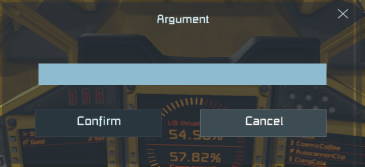
Then you can enter argument in the dialog box:
Available commands:
| Command | Description |
|---|---|
toggle_gaa |
Toggles state of gravity align |
set_gaa_pitch <value> |
Set pitch/tilt for gravity align feature. You can use numbers from <-90, 90> range (ie. set_gaa_pitch 45 to instantly set it to 45 degrees) or use increments (ie. set_gaa_pitch +5 will add 5 degress to current pitch after each command invokation) or decrements (ie. set_gaa_pitch -5 will subtract 5 degress to current pitch after each command invokation) |
dump <OreName> |
If specified ore is not currently on conveyor sorter whitelist it will be added to that list, if it’s on then it will be removed. First invokation of dump Stone will add stone, while second will remove it. You can set each ore independently, ie. you can run dump Ice and then dump Stone to have both ice and stone on whitelist. |
toggle_cruise |
Toggles state of cruise control |
set_cruise <value> |
Set desired speed for cruise control feature. You can use numbers any number (ie. set_cruise 20 to instantly set it to 20 m/s) or use increments (ie. set_cruise +10 will add 10 m/s to current target speed after each command invokation) or decrements (ie. set_cruise -10 will subtract 10 m/s to current target speed after each command invokation) |