Screens
There is few various information screens that can be setup to display on any screen surface ingame. ExcavOS will try to adapt it to available size but most smallest surfaces are not really usable.
Setup is done by using Custom Data of said block. ExcavOS will once in a while scan for this entries and hook up display if valid configuration is found.
For most display blocks this will be enough:
[ExcavOS]
Surface0=ScreenName
While for blocks with more surfaces, like cockpits you can define more:
[ExcavOS]
Surface0=Weight
Surface1=CargoOre
Surface2=Cargo
Surface3=Utility
EnableImmersion=true
Setting EnableImmersion to true will enable small immersive feature of booting up sequence whenever you enter cockpit (and this works only for cockpits).
You can change colors using default game controls.
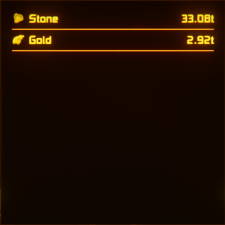
Summary of ore cargo
Screen identifier: CargoOre
| Screen preview | Empty variant |
|---|---|
 |
 |
This screen will show total summary of all ores found in tracked inventory spaces, by default this means all blocks with inventory, but you can customize it to only track specific blocks.
Example setup for this screen:
[ExcavOS]
Surface0=CargoOre
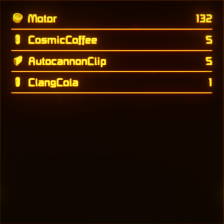
Summary of nonore cargo
Screen identifier: Cargo
| Screen preview | Empty variant |
|---|---|
 |
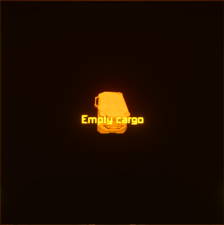 |
This screen will show total summary of all items (that are not ores) found in tracked inventory spaces, by default this means all blocks with inventory, but you can customize it to only track specific blocks.
Example setup for this screen:
[ExcavOS]
Surface0=Cargo
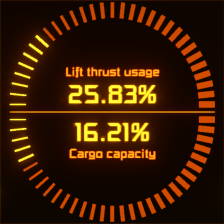
Weight and lift
Screen identifier: Weight
| Screen preview | Change in cargo capacity | Warning above threshold |
|---|---|---|
 |
 |
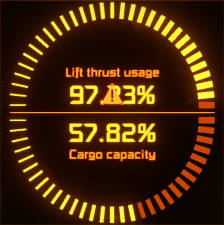 |
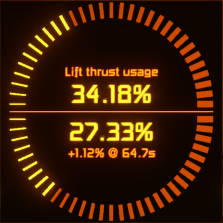
This screen will quite a few things. First of all you can quickly tell how much lift thrust is being currently used and how much cargo capacity is left.
Once you starting mining and ores start filling up containers you will see delta increase (percentage of cargo filled in last second) telling how fast you will fill up with current yield.
If your lift thrust usage will exceed defined threshold you will see blinking warning sign.
total summary of all items (that are not ores) found in tracked inventory spaces, by default this means all blocks with inventory, but you can customize it to only track specific blocks.
Example setup for this screen:
[ExcavOS]
Surface0=Weight
Utility
Screen identifier: Utility
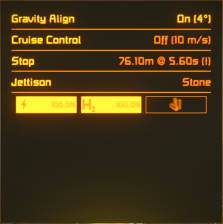
This screen will show status of various utility features of ExcavOS that can be controlled via commands.
From this example screen we can tell that:
- gravity align is enabled and will lock ship tilted 4 degress up from gravity plane
- cruise control is disabled, but it’s set to maintain 10m/s speed
- to fully stop (in forward direction) it will take 5.6 seconds over 76m distance, exclamation mark informs about at least one thruster responsible for stopping not being operational
- conveyor sorters whitelist is set to stone
- ship is fill on energy and hydrogen powers and there is no reactor on it
Note: uranium level is multiplied by 1000 due to how little reactors request uranium and how much they can hold. Without that this bar would be almost always empty and thus useless.
Example setup for this screen:
[ExcavOS]
Surface0=Utility