Welcome miner to bright future, underground!
Do you often wonder while mining: Is the miner already full? How much my miner can carry and not fall down in planet gravity? If yes, then this script is for you.
Where to get it?
Steam Workshop or Mod.io.
ExcavOS key features
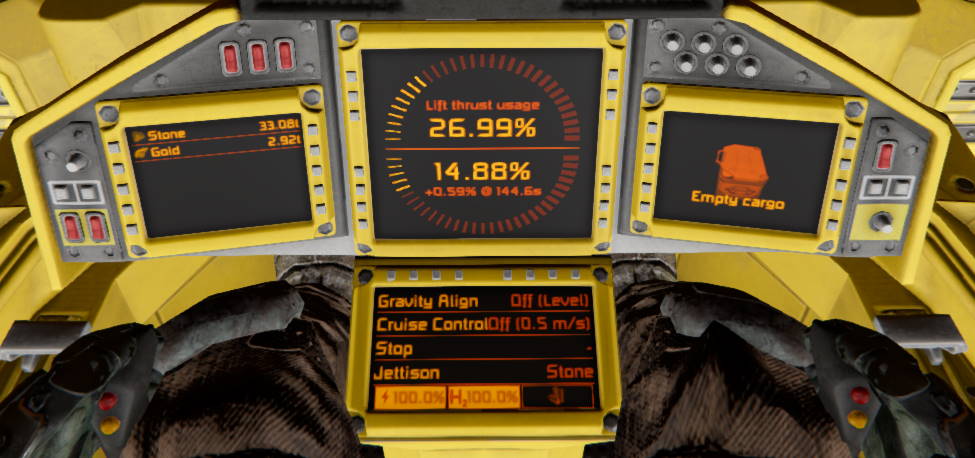
- Quick overview of cargo. You can see how much of which ore you have mined and how much cargo space there is left.
- Lift thrust usage. Tells you how much more you can carry and still be able to withstand planet gravity.
- Align to gravity with ability to set custom pitch.
- Support for ejecting systems. Allows to quickly dump any ore by manipulating whitelist on sorters.
- (WIP) Cruise control.
- Stopping distance calculation.
- Battery, hydrogen and uranium levels.
- Works on any screen surface (cockpits or standalone screens).
How to use it?
After loading script into programmable block if it’s Custom Data is empty then it will be prefilled with default configuration. For more information about this values please refer to configuration. As for now you do not need to worry about that.
Then you need to tell ExcavOS which screen to use and what to show. You can start with following snippet and customize from there:
[ExcavOS]
Surface0=Weight
Surface1=CargoOre
Surface2=Cargo
Surface3=Utility
EnableImmersion=true
Paste it in Custom Data of a block that contains screens on which you want ExcavOS, for example into your miner cockpit Custom Data. Using syntax SurfaceN=ScreenName you can define on which screen (N) what type of info screen (ScreenName) you would like to have. Please refer to screens for more info.